15 Financial Modeling Best Practices for Clear Excel Models

15 Financial Modeling Best Practices for Clear Excel Models
A single mislinked cell in a spreadsheet can cascade into a million-dollar error. If you've spent any time building or auditing deal models, you already know this. The difference between a model that holds up under scrutiny and one that falls apart often comes down to discipline, specifically, how well you follow financial modeling best practices from the very first tab.
Good models aren't just accurate. They're readable, auditable, and built so someone else can pick them up without a walkthrough. That matters whether you're passing a file to your investment committee, handing it off to a lender, or revisiting your own assumptions six months later.
At Leni, we build AI that automates underwriting and financial analysis for commercial real estate teams. Our platform generates structured models from OMs, rent rolls, and T12s, and it does so by following the same foundational principles outlined in this guide. We've seen firsthand what separates clean, reliable models from fragile ones.
Below are 15 practices that will make your Excel models clearer, more consistent, and far easier to trust. Each one is actionable, and together they form a framework you can apply to any deal model you build from scratch, or any template you inherit.
1. Use Leni to automate data extraction
Before you build a single formula, you need clean, structured data. Most financial modeling best practices assume you're starting from organized inputs, but in commercial real estate, that's rarely the case. You're often handed a scanned rent roll, a PDF offering memorandum, or a messy T12, and you have to manually pull every number into your spreadsheet before the real modeling work can begin.
What it fixes
Manual data extraction is where errors begin. When you type numbers by hand from a document into Excel, you introduce transcription risk at every row. A single misread digit in your effective gross income or vacancy rate can distort every downstream calculation in ways that are hard to trace.
Beyond accuracy, manual extraction is slow. It can take an analyst several hours to process a single OM, time that should go toward analyzing the deal, not entering data. Automating that step removes both the time cost and the error risk in one move.
The fastest way to reduce model errors is to reduce manual data entry. If the input is wrong, no formula will save the output.
How to do it in practice
Leni connects directly to your source documents, including OMs, rent rolls, and T12 financial statements, and extracts structured data without manual re-entry. You upload the document, and Leni returns organized, labeled outputs that map directly into your underwriting template. From there, you review, adjust assumptions, and model. The extraction step becomes a verification task instead of a data entry task.
This matters most when you're running multiple deals in parallel. Instead of having analysts tied up pulling numbers from PDFs, they can focus on sensitivity analysis, market comparisons, and deal-level judgment calls that actually require human thinking.
Common mistakes to avoid
The most common mistake is treating extraction as a low-risk step. Teams often rush it and only catch data errors mid-model, which means backtracking through formulas to find where the wrong number entered the workbook.
A second mistake is skipping a validation pass after extraction. Even with automation, you should spot-check key line items against the source document before you build out your calculations. Build that verification step into your standard workflow from day one, and treat it as non-negotiable before any formula work starts.
2. Start with the decision and the output
Most modelers open a blank spreadsheet and start building from the top left corner, adding rows as they think of them. This approach produces models that grow in every direction with no clear destination. Before you write a single formula, identify the decision this model needs to support and define exactly what the output should look like.
What it fixes
Starting without a defined output is one of the most common violations of financial modeling best practices. It leads to bloated models with tabs nobody uses and calculations that don't connect to anything a stakeholder actually needs to see.
Clarity about the output shapes every structural decision you make before the first formula goes in.
When you know the decision upfront, whether it's a go/no-go on acquisition or a hold versus sell recommendation, you can work backward and build only what supports that call.
How to do it in practice
Sketch the output before you open Excel. Write down the two or three key metrics your decision-maker needs, such as levered IRR, equity multiple, or cash-on-cash return, then build only the tabs and calculations required to produce those numbers accurately.
Keep that output definition visible while you work. If a new row or tab doesn't directly feed the output, question whether it belongs in the model at all.
Common mistakes to avoid
The most common mistake is building first and deciding later what the model is for. This creates unnecessary complexity that makes the file harder to audit and harder to hand off cleanly.
A second mistake is assuming the output will become obvious once you finish. Write it down before you start, and hold to it.
3. Use a clean flow across the workbook
A workbook with no clear flow forces every reader to reverse-engineer your logic from scratch. When tabs are scattered and calculations jump between sheets with no pattern, you add friction to every audit, every handoff, and every update. Clean workbook structure is a core element of financial modeling best practices that pays dividends every time someone opens the file.

What it fixes
Disorganized workbooks create two problems at once: they hide errors and they slow everyone down. When a reviewer has to hunt for where a number comes from, they either give up or miss the mistake entirely. A logical tab order eliminates that hunt and makes the model far easier to stress-test.
A model that flows in one direction is a model anyone can follow without a guide.
How to do it in practice
Organize your tabs so they move left to right in the same direction your logic moves: inputs on the left, calculations in the middle, and outputs on the right. Label every tab clearly with a short, descriptive name rather than "Sheet3" or "Misc." Use a consistent color system for tab labels so readers instantly know whether they're looking at an assumption tab, a calculation tab, or a summary.
Within each sheet, data should flow top to bottom with no loops or jumps back up the page. Reserve the top rows for headers and period labels, and keep your row labels in a fixed left column throughout the workbook.
Common mistakes to avoid
The most common mistake is adding tabs as you think of them rather than planning the tab structure upfront before any formula work begins. A second mistake is letting calculation logic bleed into your input tabs, which creates dependencies that are nearly impossible to trace cleanly during a review.
4. Separate inputs from calculations and outputs
Mixing your assumptions, formulas, and results into the same cells is one of the fastest ways to turn a workbook into an audit nightmare. This separation is a foundational rule in financial modeling best practices, and it applies regardless of how simple or complex your deal structure is.
What it fixes
When inputs live inside formulas, anyone reviewing the model has to open each cell to understand what's a fixed assumption and what's a live calculation. That makes error-checking slow and unreliable. Keeping inputs isolated means you can update a rent growth rate or exit cap assumption in one place and trust that the change flows correctly through every downstream formula without hunting for duplicates.
A model where inputs, calculations, and outputs occupy separate spaces is a model anyone can update without breaking something.
How to do it in practice
Dedicate a single inputs tab at the front of your workbook for every assumption that a user might need to change: growth rates, vacancy rates, hold period, financing terms, and purchase price. Your calculation tabs should pull from that inputs tab using direct references, never retyped numbers. Your output tab then pulls only from the calculation layer, keeping the presentation clean and free of any raw formula logic.
Common mistakes to avoid
The most common mistake is building quickly and dropping hardcoded numbers directly into calculation rows to save time, intending to clean it up later. That cleanup rarely happens. A second mistake is splitting inputs across multiple tabs, which makes it just as hard to track changes as having no separation at all.
5. Use consistent time periods and a clear calendar
Time period inconsistencies are among the hardest modeling errors to catch because they rarely produce obvious error flags in Excel. Your model might calculate cleanly and still produce results that are fundamentally wrong because monthly rent figures are being compared to annual expense totals, or because your hold period assumption doesn't align with the period headers driving your cash flow columns.
What it fixes
Mixing time conventions inside a single model breaks the relationship between rows in ways that are invisible to any formula check. A reviewer scanning output numbers has no way to detect a units mismatch unless the structure is clear from the start. Consistent time periods across every tab keep your calculations comparable and your outputs trustworthy.
One mismatched time period in a cash flow model can invalidate every return metric the model produces.
How to do it in practice
Set your period convention at the top of your inputs tab before you build anything else. Define whether the model operates on a monthly, quarterly, or annual basis, and enforce that convention across every calculation tab. Label every period column with an explicit date header, not just "Year 1" or "Month 6," so readers always know the exact calendar window each column represents. If you need to mix conventions for a specific schedule, annualize or de-annualize in a dedicated conversion row and document it clearly.
Common mistakes to avoid
Following financial modeling best practices means treating period consistency as a structural rule, not a formatting preference. The most common mistake is building column headers loosely and relying on memory to track what each period represents. A second mistake is converting between monthly and annual figures inside a formula without leaving a visible, labeled conversion step that reviewers can verify.
6. Apply strict color coding from day one
Color coding is one of the simplest structural decisions in financial modeling, and one of the most frequently skipped. When you open a model and every cell looks identical, you have no way to tell which numbers are inputs, which are formulas, and which are linked from another sheet. Applying a consistent color system from the start removes that ambiguity instantly.

What it fixes
Without color coding, every reviewer has to click into individual cells to understand whether a value is hardcoded or calculated. That slows down audits and increases the chance that someone accidentally overwrites a formula while trying to update an assumption. A clear visual hierarchy keeps the model legible at a glance and reduces the risk of structural errors during updates.
Color coding is not cosmetic. It is a functional layer that protects your model from the most common class of editing errors.
How to do it in practice
Apply a standard convention across every tab in your workbook from the first day you build the file. The most widely used system in financial modeling best practices uses blue text for hardcoded inputs, black text for formulas, and green text for links pulling from other sheets. Use a light yellow cell fill to highlight input cells that users are expected to change, so anyone opening the model knows exactly where to go.
Common mistakes to avoid
The most common mistake is applying color retroactively after the model is mostly built. Retroactive formatting is inconsistent and easy to miss. A second mistake is using too many colors, which defeats the purpose by creating visual noise instead of clarity and forcing readers to remember a legend rather than reading the model intuitively.
7. Choose a sign convention and enforce it
Sign conventions determine whether costs appear as positive or negative numbers in your model. Without a clearly defined and enforced convention, a model that looks correct can produce results that are fundamentally wrong, especially when expenses, debt service, and distributions mix across different tabs built by different people at different times.
What it fixes
Inconsistent sign conventions create silent errors that your model will never flag. If one tab treats cash outflows as negative and another treats them as positive, any formula that aggregates across those tabs will produce a wrong total with no warning. This is one of the most disruptive issues in financial modeling best practices because it corrupts return metrics precisely and invisibly.
A sign error that reaches your IRR calculation is one of the hardest model mistakes to catch after the fact.
How to do it in practice
Pick one convention at the start and write it in a visible note on your inputs tab. The most common approach in real estate modeling treats cash inflows as positive and outflows as negative, so net cash flow is simply the sum of the column. Apply that convention to every row across every tab, without exception. If you pull a schedule from an external source that uses the opposite convention, flip the signs in a dedicated row before linking those values anywhere else in the workbook.
Common mistakes to avoid
The most common mistake is assuming everyone on the team shares the same default convention without ever stating it explicitly. A second mistake is flipping signs inside a final summary formula rather than correcting the source, which buries the adjustment where no reviewer will find it.
8. Keep one row, one calculation
When a single row in your model performs two or three different operations at once, anyone auditing that row has to untangle the logic before they can verify whether it's correct. Keeping one row limited to one calculation is a foundational rule that makes your model transparent and fast to review at every level of complexity.
What it fixes
Compound rows hide errors. When a formula multiplies a rate, adjusts for vacancy, and applies a growth factor all in one cell, a reviewer can't easily confirm whether each component is correct without rebuilding the logic from scratch. Splitting each operation into its own labeled row exposes every step and makes it immediately clear where a number comes from and where it goes next.
A model where every row does one thing is a model where every row can be checked in seconds.
How to do it in practice
Label each row with a short, precise description of exactly what that row calculates, then write a formula that does only that one thing. If you need an intermediate value to reach a final result, give that intermediate step its own dedicated row with its own label. This approach also makes sensitivity testing and troubleshooting far faster because you can isolate any single step without disturbing the rows around it.
Common mistakes to avoid
Following financial modeling best practices means resisting the urge to compress logic into fewer rows to make the model look cleaner. Fewer rows is not the same as better structure. A second mistake is nesting multiple functions inside a single formula without explanation, which makes the cell look efficient but forces every reviewer to decode it rather than read it.
9. Never hard-code assumptions inside formulas
When you type a number directly into a formula rather than referencing a dedicated input cell, that number becomes invisible to anyone reviewing the model. Hard-coded assumptions buried inside calculations are one of the most persistent violations of financial modeling best practices because they look clean on the surface while hiding critical decisions where no reviewer will think to look.
What it fixes
Every assumption you lock inside a formula requires someone to open that cell to find it. When your rent growth rate or expense ratio lives inside a formula, updating it means hunting through every cell where you used that number and changing each one manually, with no guarantee you caught them all.
A model where assumptions live in formulas is a model where assumptions can change without anyone noticing.
How to do it in practice
Every value that represents a decision or a judgment call belongs in your inputs tab, not inside a formula. Reference that cell directly from every calculation that depends on it. If your cap rate assumption appears in three different places across the model, all three should point to one source cell on your inputs tab, so changing that single cell updates the entire workbook instantly and correctly.
Common mistakes to avoid
The most common mistake is hard-coding a number temporarily during a build and never moving it to the inputs tab before sharing the file. A second mistake is treating small or "obvious" assumptions, like a standard vacancy rate or a fixed management fee percentage, as too minor to deserve an input cell. No assumption is too small to expose.
10. Repeat and link to keep formulas short
Long, nested formulas are harder to audit than short ones. When a single cell tries to pull data from three different sheets, apply two adjustments, and return a final result all at once, every reviewer who opens that cell has to mentally unwrap the entire chain before they can verify whether it's correct. Keeping formulas short by repeating intermediate values and linking cleanly between cells is a core principle of financial modeling best practices.
What it fixes
Complex formulas compress multiple steps into a single cell that no reviewer can verify at a glance. When you break a long formula into linked intermediate steps, each value becomes visible, labeled, and independently checkable. This removes ambiguity from your model and makes it significantly faster to trace any unexpected result back to its source without opening ten cells in sequence.
A short formula linked to a clear intermediate row is always easier to verify than a long formula that attempts everything at once.
How to do it in practice
When a calculation requires more than two or three operations, pull the intermediate result into its own dedicated row before using it in the next step. Reference that row directly rather than repeating the underlying logic. Across tabs, always link to a single source cell rather than re-entering the same value or rebuilding the formula in a second location. One source, one link, one place to check.
Common mistakes to avoid
The most common mistake is treating formula length as a sign of modeling skill. Shorter formulas built from clean intermediate steps are structurally stronger than compressed ones. A second mistake is copying a formula into a new location instead of linking back to the original, which creates duplicate logic that diverges the moment either copy gets updated independently.
11. Build schedules first, then link to statements
When you try to build your income statement, balance sheet, and cash flow statement all at once, you force yourself to calculate and present at the same time. Those are two different jobs, and combining them inside a single tab produces formulas that are impossible to verify cleanly. The right sequence is to build your supporting schedules first, then pull their outputs into your statements through direct links.
What it fixes
Schedules isolate the complex math that feeds your statements. When your debt schedule, depreciation schedule, and capital expenditure schedule each live in their own dedicated space, every calculation is visible, labeled, and independently testable before it ever reaches a summary statement. Linking from a clean schedule into a statement means the statement row carries one simple reference, not a nested formula that requires unpacking.
Building schedules before statements is what separates a model that communicates clearly from one that forces every reader to reverse-engineer your logic.
How to do it in practice
Build each schedule as a self-contained tab that starts from your input assumptions and ends with a clearly labeled output row. Once the schedule is complete and verified, link that output row into the relevant line of your income statement or cash flow summary using a direct cell reference. Never rebuild the logic inside the statement itself. One place calculates, one place displays.
Common mistakes to avoid
This is one of the most overlooked financial modeling best practices because it adds tabs to the workbook, which feels like extra work. The most common mistake is collapsing a schedule into a single formula inside a statement row to keep the file compact. A second mistake is linking from a mid-schedule row rather than a final output row, which makes it harder to update the schedule without breaking the statement reference.
12. Build scenarios with a simple switch
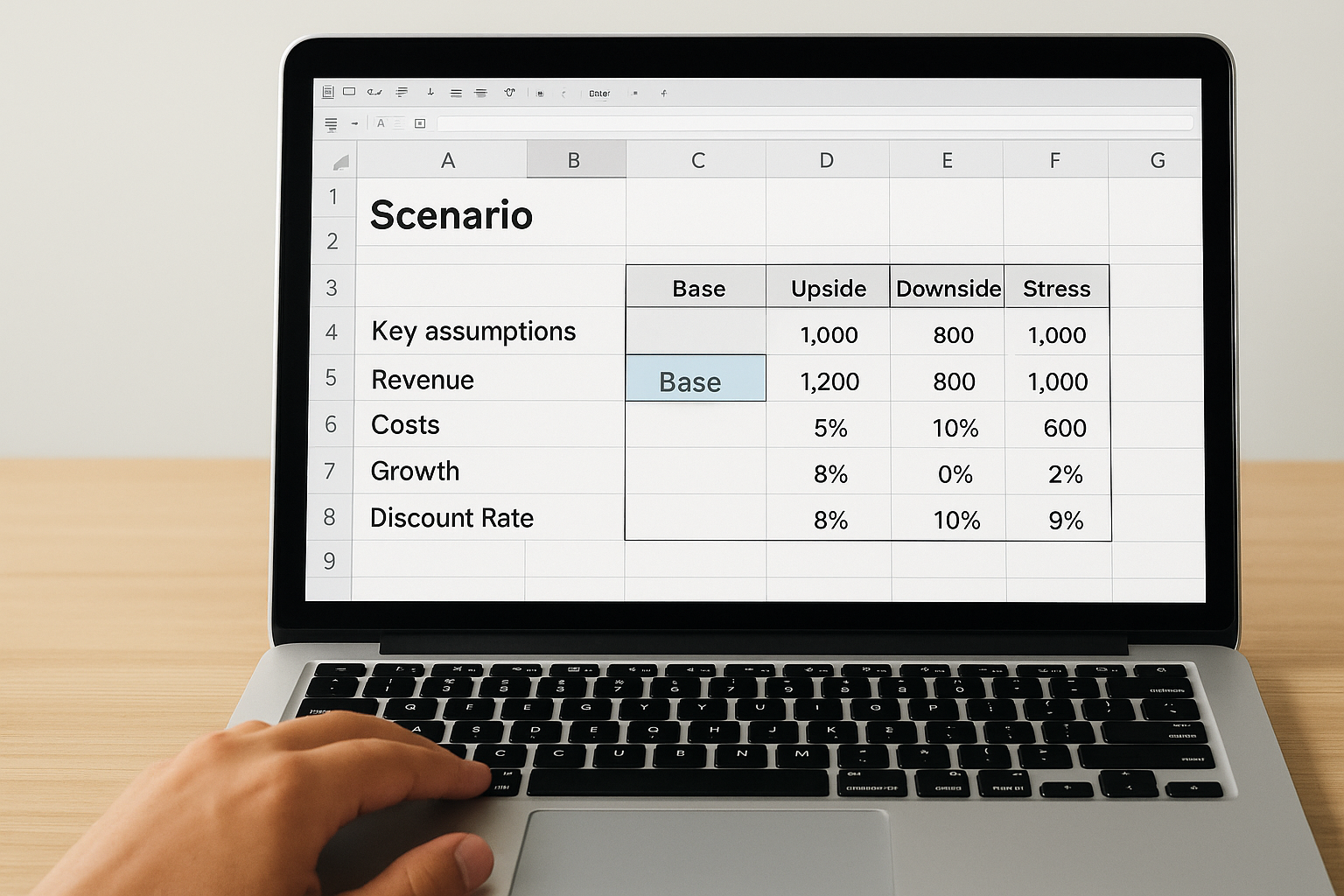
Scenarios let you test how your deal performs under different assumptions without building separate copies of the model. The right way to do this is with a single switch cell that changes the active scenario across the entire workbook instantly. This is a core part of financial modeling best practices that keeps your model compact and your analysis credible.
What it fixes
Without a scenario switch, most modelers either build multiple versions of the same file or manually overwrite inputs whenever they need to test a different case. Both approaches destroy auditability. Multiple files diverge over time, and overwritten inputs leave no record of what the original assumptions were.
A scenario switch lets you move between base, upside, and downside cases in one click without touching a single formula.
How to do it in practice
Create a dedicated scenario table on your inputs tab that lists your key assumptions under three or four labeled columns: Base, Upside, Downside, and Stress. Add a single switch cell where you enter a number or a label corresponding to the active scenario. Then use an INDEX or CHOOSE formula in each assumption row to pull the correct value from your scenario table based on whatever the switch cell contains. Every downstream calculation updates automatically when you change the switch.
Common mistakes to avoid
The most common mistake is building scenarios by copying tabs and adjusting them separately, which creates multiple versions of your model that are nearly impossible to keep synchronized. A second mistake is placing the switch cell in an obscure location where reviewers won't find it, rather than keeping it clearly labeled at the top of your inputs tab.
13. Add error checks and an error summary
Error checks are the internal audit layer that catches formula breakdowns and broken links before your model reaches anyone who depends on it. Without them, a model can display numbers that look reasonable while producing results that are fundamentally wrong, and you won't know until the damage is done.

What it fixes
Manual reviews miss errors because reviewers look for logical problems, not mechanical ones. A dedicated error check system catches the mechanical failures automatically: balance sheet imbalances, cash flow figures that don't reconcile, and period totals that should match but don't. These are the errors that cause the most damage in high-stakes decisions precisely because they're invisible to a casual read.
An error summary tab that flashes a warning keeps a broken formula from reaching your investment committee undetected.
How to do it in practice
Build a dedicated error check row at the bottom of each critical schedule using simple IF statements that return "OK" or "ERROR" depending on whether a key relationship holds. For example, check that your beginning balance plus activity equals your ending balance in every period column. Then create a single error summary cell on your output tab, or a standalone summary tab, that aggregates all those individual checks into one visible flag. If any check fails, the summary lights up and stops the review before it starts.
Common mistakes to avoid
Following financial modeling best practices means treating error checks as structural, not optional. The most common mistake is adding checks only to the balance sheet and ignoring cash flow reconciliations and schedule subtotals. A second mistake is writing error checks that reference the wrong cells, so they return "OK" even when the underlying logic is broken.
14. Control circular references with a breaker
Circular references occur when a formula depends on the result of its own calculation, which is common in models with interest expense tied to a revolving credit balance or debt service reserves that accrue interest. Left unmanaged, they force Excel into iterative calculation mode, which produces results that shift unpredictably depending on how many times the calculation cycles before it stops.
What it fixes
Without a breaker, circular references create instability across your entire workbook. Excel's iterative calculation setting can converge on a result, but it can also converge on the wrong one, and you have no clean way to verify which it did. A breaker switch gives you direct control over when iteration runs, so you can turn it off during builds and audits without losing any of your model structure.
A model that relies on uncontrolled circular references is a model that can produce a different answer every time someone opens the file.
How to do it in practice
Add a single toggle cell on your inputs tab, labeled "Circ Switch" or similar, that holds either a 1 or a 0. Wrap the formula driving the circular reference in an IF statement that references this toggle: when the switch is 1, the live formula runs; when it is 0, the cell returns a fixed prior-period value that breaks the loop. This lets you disable the circular reference during troubleshooting without deleting any logic from the workbook.
Common mistakes to avoid
Following financial modeling best practices means never letting circular references run uncontrolled in a shared file. The most common mistake is enabling Excel's iterative calculation globally and forgetting about it, which means every model you open on that machine runs with iteration on by default. A second mistake is placing the breaker in an unlabeled or hidden cell where no reviewer will find it or understand what it controls.
15. Make the model safe to hand off and print
A model that only works for the person who built it is an incomplete model. Before you share any file with a lender, a partner, or your investment committee, protect its structure and confirm it presents clearly whether someone opens it on screen or prints it to a PDF. This final step separates a finished model from a working draft.
What it fixes
Unprotected models invite accidental edits. When a reviewer opens your file and overwrites a formula cell while trying to update an assumption, they may not realize the damage until results look wrong and the source is unclear. Sheet protection eliminates that risk by locking every cell that should not change and leaving only the intended input cells editable. Print settings fix a separate problem: models that print across dozens of pages with no headers or column labels are unreadable and unprofessional.
A model that survives a handoff without breaking is the final proof that your structure is sound.
How to do it in practice
Lock all formula and output cells using Excel's sheet protection, and leave only your designated input cells unlocked. Set a print area for each tab you expect reviewers to view, add frozen row and column headers, and test the print layout at least once before you distribute the file. Save a PDF copy alongside the Excel file so reviewers without access to the workbook can still read every number correctly.
Common mistakes to avoid
Following financial modeling best practices means treating handoff preparation as a required step, not an afterthought. The most common mistake is skipping sheet protection entirely because the model feels "finished." A second mistake is never testing the print layout, which means a lender receives a file that cuts column headers off halfway through the page.
A simple checklist before you share
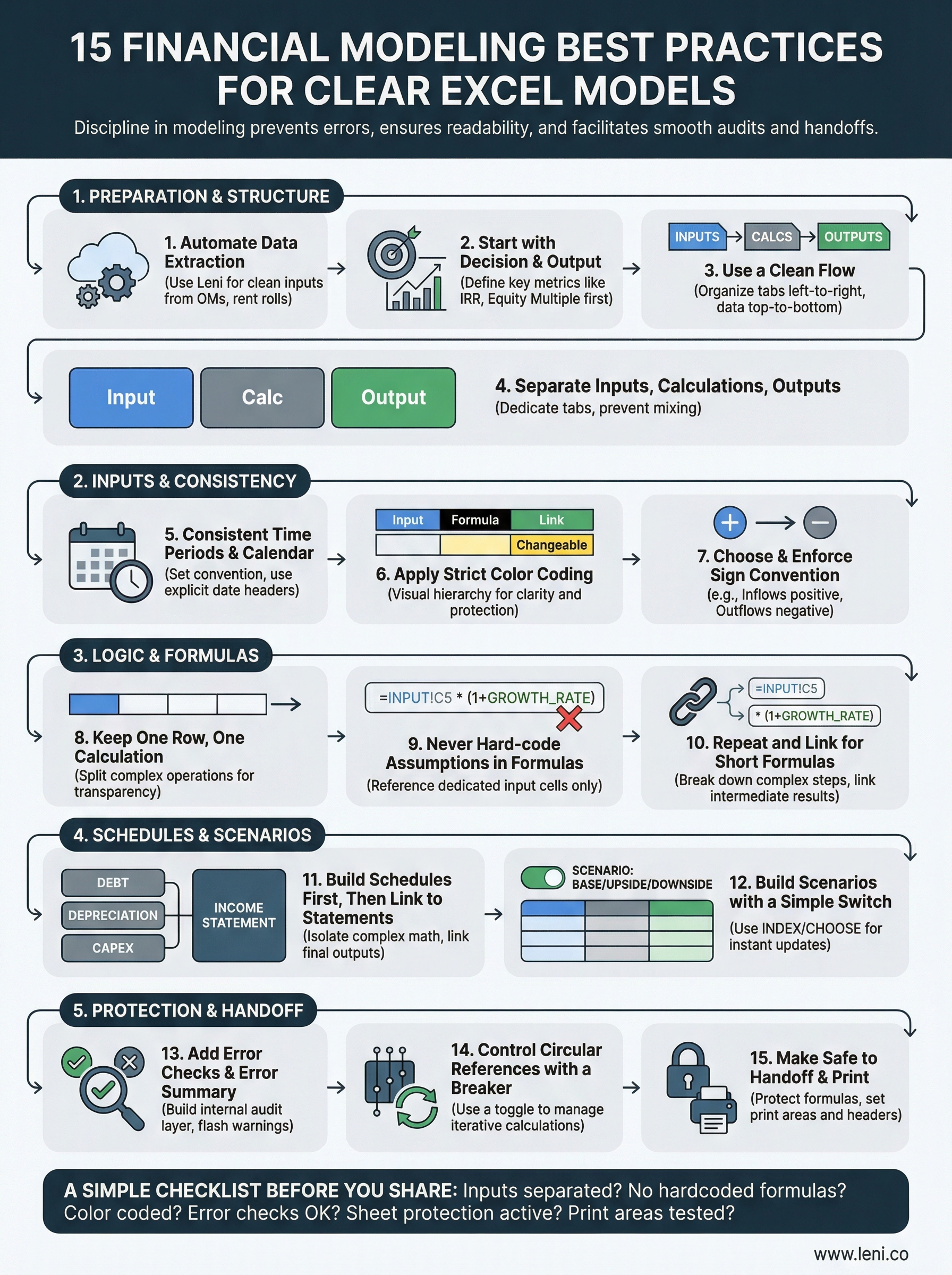
These 15 financial modeling best practices cover everything from data extraction to handoff preparation. Before you send any model to a lender, partner, or investment committee, run through this quick checklist to confirm the file is ready.
Inputs live on a dedicated tab, separate from calculations and outputs
Every assumption references a single source cell, with no hardcoded numbers inside formulas
Color coding is applied consistently across every tab
Error checks return "OK" on every schedule
Sheet protection is active, with only input cells unlocked
Print areas and headers are set and tested
If any item fails, fix it before the file leaves your hands. A model that passes every check is a model that holds up under scrutiny from anyone who opens it.
Commercial real estate teams that want to eliminate manual data entry and build faster, cleaner models can get started with Leni today.

Johanna Gruber
Johanna has spent the last 8 years helping marketing teams connect with audiences through content. Specializing in B2B SaaS and real estate.
MEET LENI
Get Portfolio Insights With Leni Analytics
Dive into a live demonstration of Leni Analytics and discover how intuitive data visualization and real-time insights can transform your decision-making process.